Exporting the log file
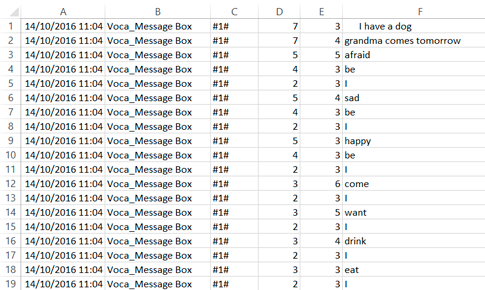
| Column | Data |
|---|---|
| A | Date and time |
| B | Document name |
| C | Page title |
| D | Column on the communication grid |
| E | Row on the communication grid |
| F | Label of log text |
Note: If a cell is made up of several cells, the row and column in
the log file are displayed starting from the top left corner of the
cell.
Note: If the Freestyle page type
is used, the coordinate for the top left corner of the cell is displayed on a scale
of 100.
- Choose .
- Enter the name of the file in the Filename field.
- From the Save as drop-down list, select the file type:
- Text Documents (*.txt)
- CSV Files (*.csv)
- Click Save.